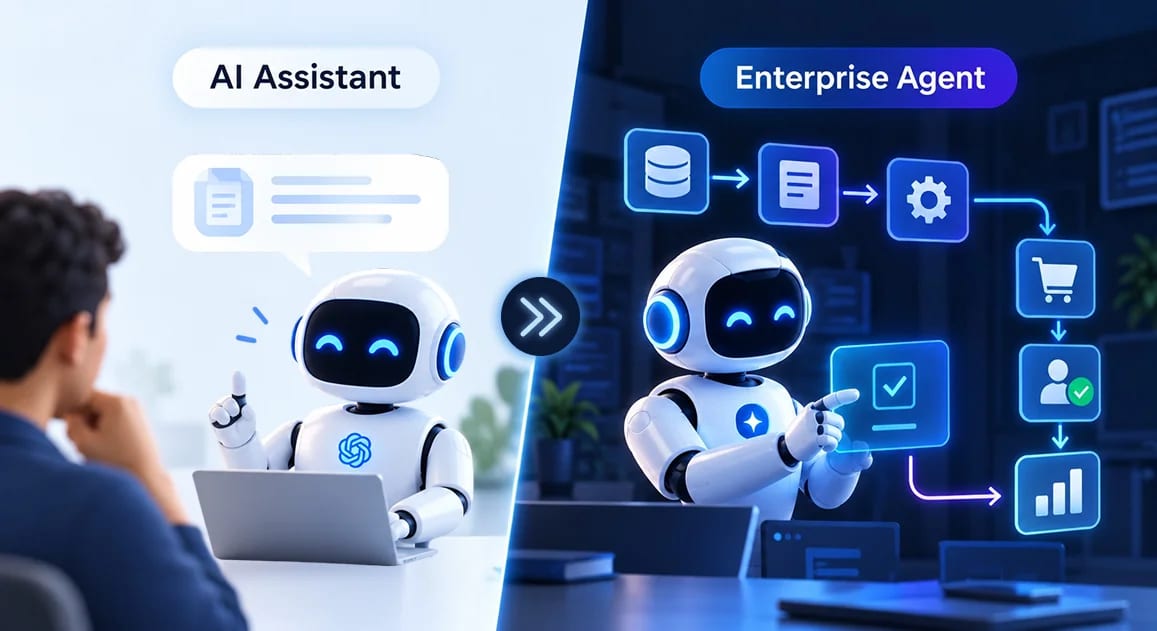
An AI assistant tells you what is happening. Enterprise AI helps the business do something about it.
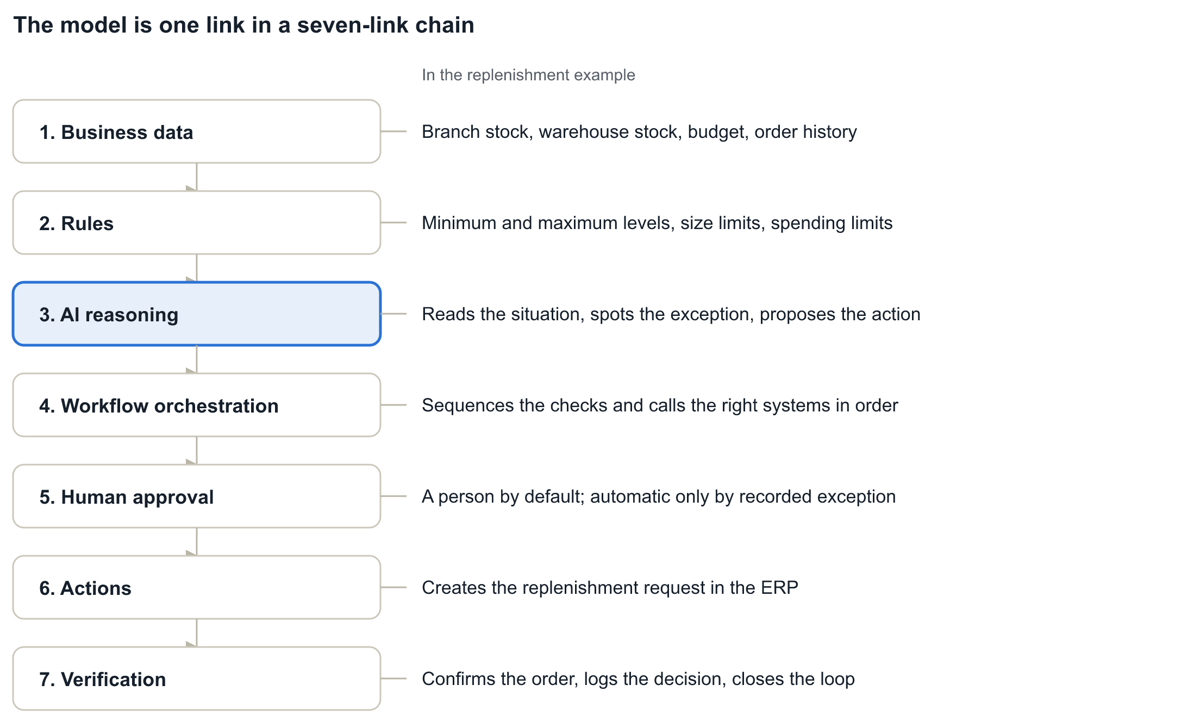
The model is the smallest part. The value comes from the chain around it: data, rules, reasoning, orchestration, approval, action, verification.
Action needs boundaries. Reading, drafting and internal steps can run automatically. Anything that spends money, messages a customer, publishes content or changes another system waits for a person by default, unless the business has recorded a specific exception for routine, in-policy cases.
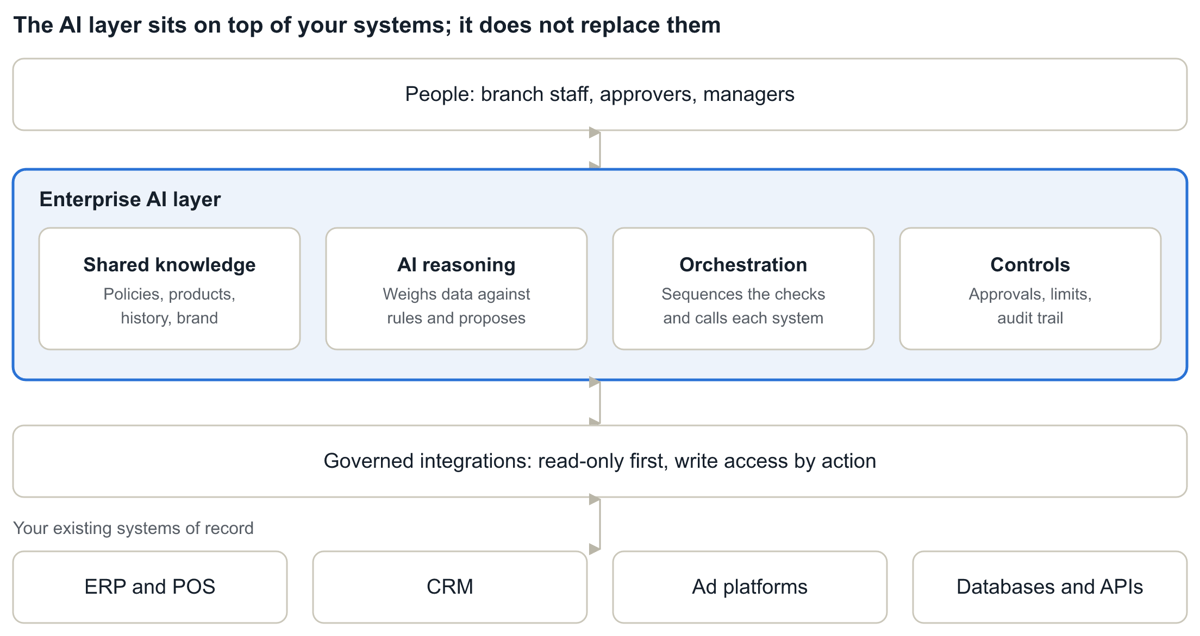
Enterprise AI should sit on top of the systems you already run, not replace them.
If you cannot trace what the AI used, decided and triggered, you are not ready to let it act.
Accuracy and privacy are ongoing disciplines: measure how often the AI is right, and give each task only the data and access it needs.
The Big Picture, in Motion
It is 7:42 on a Tuesday morning. A branch manager opens an alert: “Product X is below its recommended stock level.”
The alert is accurate and useful. It is also where the AI stops and the real work starts. The manager still has to check the warehouse, check the branch budget, confirm order quantities, make sure nobody already raised a request, create the order, chase an approval, and follow up. Forty minutes later, one alert has become one completed task.
I have spent the last few years building AI for businesses, and this gap is the one I see most often. Teams adopt an assistant, get faster answers, and then discover that the process around those answers is as manual as ever. This article is about what changes when AI can close that gap, and what a business must put in place before it does.
From answering questions to moving work forward
An AI assistant answers a question. Enterprise AI finishes the job that the question belongs to. That one shift changes almost everything you have to build.
Assistants are excellent at the first half of a task: retrieving, summarizing, drafting, explaining. They stop at the edge of the chat window. Everything after that edge stays with a person: checking another system, applying a policy, creating the record, asking for approval, following up.
| Dimension | AI assistant | Enterprise AI |
|---|---|---|
| Starting point | A person’s question | A business event: stock falls, a ticket arrives, an invoice does not match |
| Output | An answer or a draft | A completed or escalated workflow step |
| Who does the next step | The person | The system, or the right approver |
| Context | What the user pastes in | Business data, policies and rules, pulled in automatically |
| Controls | The user’s judgment | Permissions, thresholds, approvals, audit trail |
| Success measure | Quality of the answer | Time to resolution, error rate, exceptions surfaced |
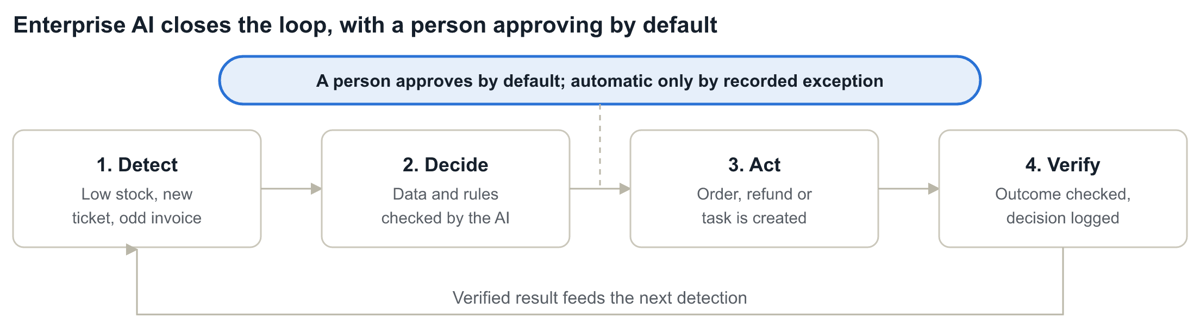
The useful mental model is a loop, not a conversation: detect an event, decide using data and rules, act in the right system, verify the result. By default, a person approves anything that spends money, messages a customer, publishes content or changes another system. The business can record an exception for routine, in-policy cases.
Enterprise AI is about the workflow, not the model
When a pilot disappoints, the first instinct is to try a bigger model. In my experience that is rarely the fix. The model is one link in a chain, and the chain breaks at the links people forget: the data that feeds it, the rules that constrain it, the approval that follows it.
The evidence points the same way. In McKinsey’s 2026 State of AI survey, nearly three-quarters of AI high performers say they fundamentally redesigned workflows because of AI, compared with about one-quarter of other respondents. Gartner makes a similar point: integrating agents into legacy workflows is often technically complex, and rethinking the workflow from the ground up is frequently the better path.
So the design question changes from “which model?” to “what is the path from signal to verified outcome?” The chain below is the one I use to answer it.
A worked example: inventory replenishment
Take a retail group with dozens of subsidiaries and many branches each. Every branch must hold enough stock to meet demand, and someone has to notice when it does not. Here is how an Enterprise AI layer would handle that process. All names and numbers below are illustrative.
The AI’s job is not to say “stock is low.” Its job is to take that signal through four checks and then choose a path:
Is stock available at the warehouse?
Is the request within the branch’s budget?
Does the order respect size limits and the value ceiling?
Is there already an open request for this product?
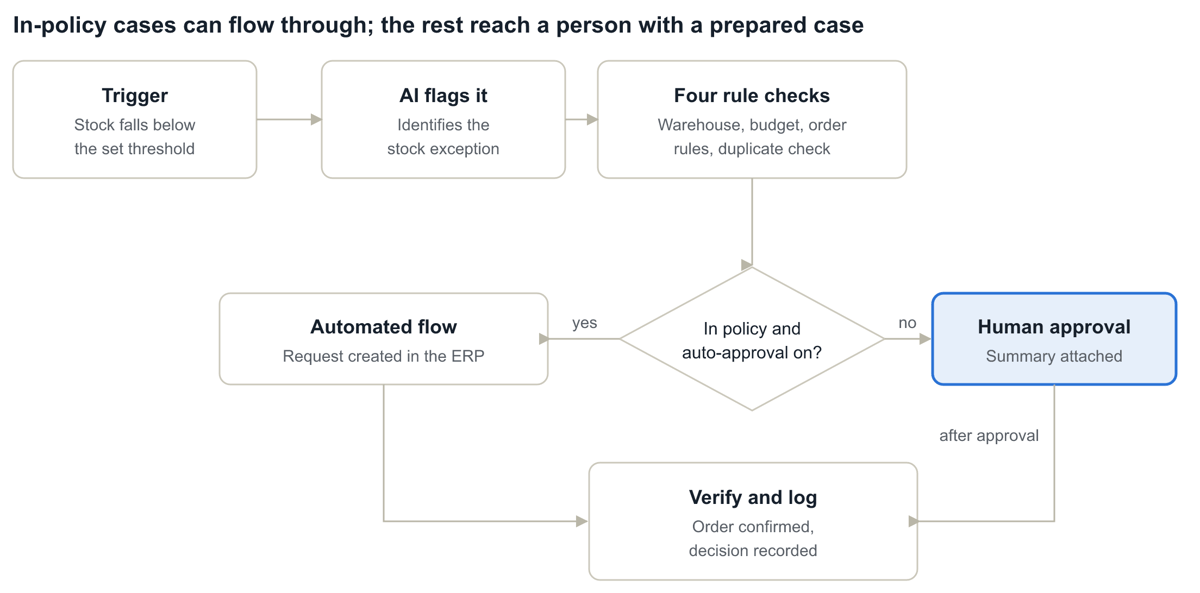
Here is how the same flow treats a routine case and an exception:
| Check | Scenario A: routine | Scenario B: exception |
|---|---|---|
| Trigger | Product X at 22 units, minimum is 40 | Product Y at 6 units, minimum is 30 |
| Warehouse stock | 300 available | 80 available, 150 needed |
| Branch budget | $1,350 order, $4,800 remaining | $9,000 order, $3,200 remaining |
| Size and value rules | 96 units, within size limits | Within size limits |
| Duplicate request | None open | None open |
| Outcome | Request created automatically, where the business has enabled auto-approval for in-policy orders | Escalated to the regional manager with a summary |
| Human time | Zero if auto-approval is enabled; otherwise one click | About two minutes to review a pre-built case |
In Scenario A, auto-approval is a deliberate choice the business has recorded, not a default. Until it is switched on, even the routine case waits for a one-click approval.
Notice what the manager in Scenario B receives. Not an alert, but a prepared decision: what is short, what the shortfall costs, which rule failed, and a recommended partial order. The AI did the legwork; the person made the call.
The key point is that the AI moves the process from detection to decision to action, while the controls stay exactly where the business put them.
The same pattern in three other functions
Replenishment is one instance of a pattern that repeats across the business: an event arrives, rules apply, most cases are routine, a few need a person. Thresholds below are illustrative; every business sets its own.
Customer refunds (service operations). A ticket arrives asking for a refund. The AI reads the message, looks up the order and payment status, and checks the refund policy. A refund under a set value, inside the return window, with a confirmed payment can be processed automatically where the business has enabled that, and the customer is told. Anything larger, outside the window, or from a flagged account goes to a support lead with the order history attached.
Ad publishing (marketing). A team needs campaign variants. The AI drafts creative within brand guidelines, checks copy against platform policy, and prepares the campaign with its budget. Drafting needs no approval. Publishing does, because the ad is customer-facing. Campaigns are created paused, so switching on spend is always a deliberate human decision, and a budget increase beyond a daily cap needs a second approval because it is a financial commitment.
Invoice exceptions (finance). An invoice arrives. The AI matches it to the purchase order and the goods receipt. If the difference is within a small tolerance, it can be approved for payment under the business’s approval rules. If the quantity or price does not match, an accounts payable specialist gets a one-paragraph summary of the discrepancy instead of two PDFs and a spreadsheet.
In all three, the value is not that the AI is clever. It is that routine cases stop consuming human attention, and exceptions arrive prepared.
One platform, five capabilities
Replenishment is one capability on a wider foundation. The same governance layer can sit under five business functions that repeat in almost every multi-unit organization, whether it is a retail chain, a restaurant group, a clinic network or a distribution business.
| Capability | What it does | Built-in control |
|---|---|---|
| Creative and content | One clean product photo becomes campaign-ready stills and short video, on a consistent brand look | An automated quality check, then a named person’s sign-off before anything publishes |
| Social and ads engagement | Routine comments (size, price, availability, booking) answered instantly from approved templates, every commenter logged as a lead, campaigns created through the platform’s official ads interface | Replies come only from approved templates. Campaigns are created paused, so activating spend is a human decision |
| Institutional knowledge | Plain-English questions answered from your own sales, campaign and operational history, with cited answers | One shared source of context. Every other capability reads from it and writes learnings back |
| Performance dashboard | One view for Group, business unit and branch, replacing system-by-system reporting | Reads from a read-only copy so live systems are never slowed. Rules flag exceptions; AI explains and ranks them from summarized figures |
| Operations and replenishment | A daily exception report plus automated reorders for routine needs | Policy checks, escalation to a named approver, and a decision record for every action |
Because all five share one governance layer, a rule, connector or report built for one is available to the others. Nothing is rebuilt team by team.
Intelligence needs context
A language model knows a great deal about the world and nothing about your business. It does not know your minimum order quantities, which supplier is on hold, or that the Colombo branch has a special budget this quarter. That context has to be supplied, accurately and on time.
The context an enterprise workflow typically needs includes:
Product and inventory information
Historical business data, such as sales and past orders
Company policies and operational rules
Brand and organizational knowledge
Customer information, with the right permissions
Workflow requirements and approval conditions
The mistake I see most often is giving every workflow its own private copy of this knowledge. The replenishment flow has one version of the order rules, the pricing assistant has another, and within a quarter they disagree.
A better design is a shared knowledge layer: one governed source of business context that every workflow draws from. When a policy changes, it changes once. When a new workflow is added, it inherits what the others already know. The result is an AI that understands not only what a piece of information means, but how the business expects it to be used.
Action needs boundaries
Giving AI the ability to act does not mean giving it unlimited autonomy. The goal is not “let AI do everything.” It is “let AI do the right things within clearly defined boundaries.”
I set those boundaries with two questions about every action: how costly is a mistake, and how easily can it be undone? Drafting a recommendation scores low on both. Sending a customer message or publishing an ad is visible and hard to retract. Spending money or committing the business financially is both costly and, often, irreversible.
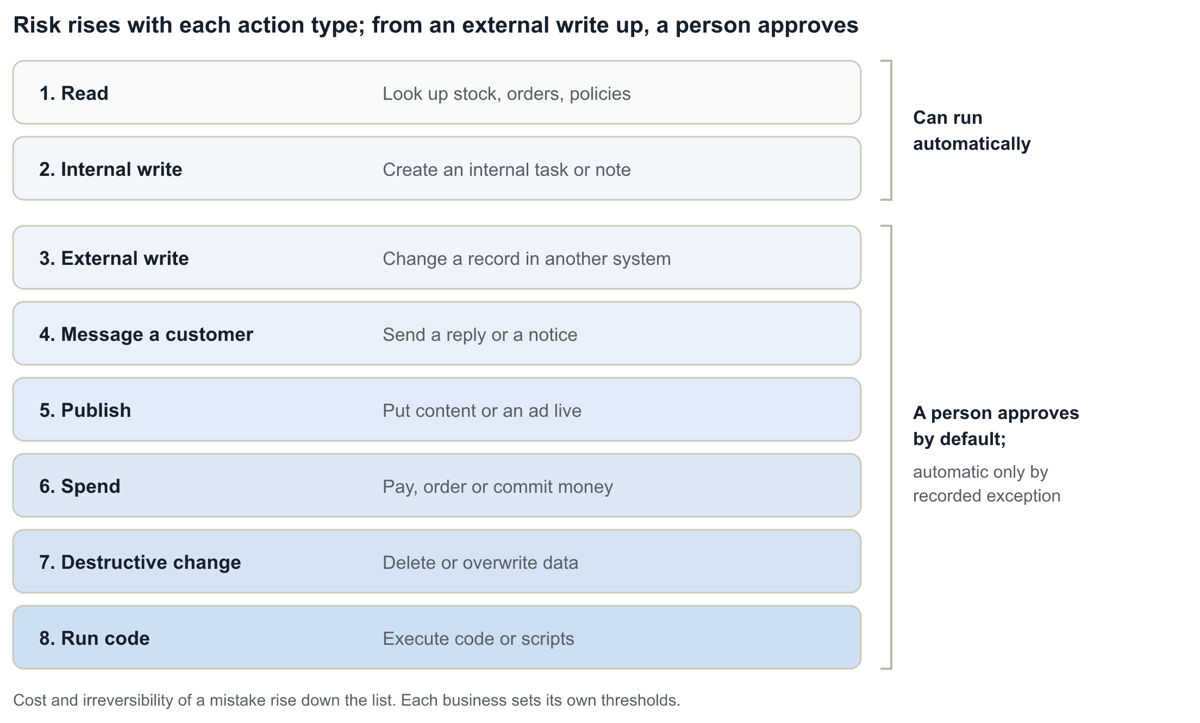
A useful ordering of actions, from lowest to highest risk: read, internal write, external write, message a customer, publish, spend, destructive change, run code. Everything from an external write upward should wait for a person by default. Automatic approval should exist only as a specific, named exception that someone deliberately configured for a routine, in-policy case.
Five practices make boundaries real rather than aspirational:
Put thresholds in configuration, not in a prompt. A spending limit that lives in a business-rules table can be audited and changed by the owner. One buried in prose instructions cannot.
Make escalation a first-class path. The AI should route to a named approver with a prepared case, not simply fail.
Keep a stop switch. Any automated action type should be pausable instantly, and a workflow should pause itself automatically if its error rate passes a set ceiling.
Require four-eyes approval. The person who starts a run should never be the one who approves it.
Route approvals through the organization tree. Resolve approvers by role and level (group, business unit, unit, branch). If nobody acts within a set time, for example 24 hours, escalate to the parent level.
Customer text is untrusted
A customer’s message is input from outside the business, so it must be treated as untrusted. It should only ever drive a narrow classification step, such as “refund request” or “stock question.” It should never become the body of an outbound reply or a parameter to a privileged action. This greatly reduces the risk of prompt injection in an unattended, customer-facing workflow, though it is one safeguard among several.
Three tiers of rules
Not every rule belongs at the same level, and being explicit about that is part of good governance:
Fixed guardrails, such as four-eyes approval and mandatory approval on spending. These ship as defaults and are not loosened by individual teams.
Business-set values, such as a stock-cover threshold, a budget cap or an approval switch. The business sets the value without writing code.
Custom logic, for a genuinely new rule type. It is added as a managed extension on top of the shared core, never as a fork of it.
This is also where leaders separate from the pack. In McKinsey’s 2025 survey, having defined processes for when model outputs need human validation was among the top factors that distinguished AI high performers. In the 2026 edition, high performers were much more likely to be working to mitigate unauthorized or unintended AI actions.
Connecting AI to the systems you already run
No business runs on one system. Inventory sits in a POS or ERP, customers in a CRM, campaigns in ad platforms, and the rest in databases, spreadsheets and internal apps. An Enterprise AI layer has to work across all of them without asking you to replace any.
We approach this with governed integrations and workflow orchestration: the AI sits above your systems of record and reaches into them through controlled connections. Five design rules matter most:
Least privilege. Start read-only. Grant write access one action at a time, scoped to what the workflow needs.
Systems of record stay the record. The ERP still owns the order. The AI creates it there, rather than keeping a shadow copy.
Execute once, never twice. Log every action that reaches an outside system as pending before it fires, with a unique key. Call it once and never retry automatically. If the result is unknown, such as a timeout, send it to a person rather than assuming it succeeded or failed.
Vetted connectors. Only reviewed tools should appear in a workflow. If a vendor changes a tool’s interface, it should revert to “needs review” instead of silently continuing, and rate limits should sit below the vendor’s own limits.
Standard interfaces. Open standards such as the Model Context Protocol are making it easier to expose tools and data to AI in a consistent, permissioned way.
This matters because integration is where projects stall. Gartner notes that wiring agents into legacy systems can be complex and disruptive, and that is a strong argument for a layer that adapts to your stack, not the other way round.
Protect personal data and control access
An AI that acts has to read business data, and much of it is personal: customer names and contact details, order histories, payment references, staff records. Treat privacy and access as design inputs from the first workflow, not as a review at the end. Six practices cover most of the ground:
Know what is personal. Before a workflow connects, list the personal data it will touch, where it comes from and who owns it.
Send the model only what it needs. Pass the fields a decision requires and replace identifiers where you can, such as a customer ID instead of a name. A stock check needs quantities, not people.
Enforce access in the data layer, not the prompt. Permissions should follow the organization tree, so a branch manager’s view, and approvals, stop at their branch. The AI should act with the requesting user’s rights or a narrowly scoped service account, never a master credential. A prompt instruction should never be the only barrier.
Keep credentials out of reach. API keys and tokens belong in a secrets store on the server, never in prompts, logs or the browser.
Keep less, for less time. Set retention periods for inputs, outputs and logs. Decision records should hold references and pseudonymous IDs instead of copies of personal details, and be deleted or anonymized on schedule.
Know where data goes. Document where data is stored and which model providers process it. Check their terms on retention and on training with your data, and choose regions that fit your obligations.
Obligations differ by country and sector. Data-protection laws such as the UK GDPR or Sri Lanka’s Personal Data Protection Act cover consent, purpose, retention and cross-border transfer, so bring your privacy lead or legal counsel in early. Then test the result: in shadow mode, confirm that nobody can reach, through the AI, data they could not reach directly.
Every action must be traceable
Once AI takes part in operations, accountability stops being optional. For any action it triggers, the business should be able to answer seven questions:
What information was used?
What rule was applied?
What decision was made?
What action was triggered?
Was human approval required?
Who approved it?
What happened afterward?
In practice that means a decision record written for every action, not a chat transcript. Here is what one looks like for the routine replenishment case from earlier (illustrative):
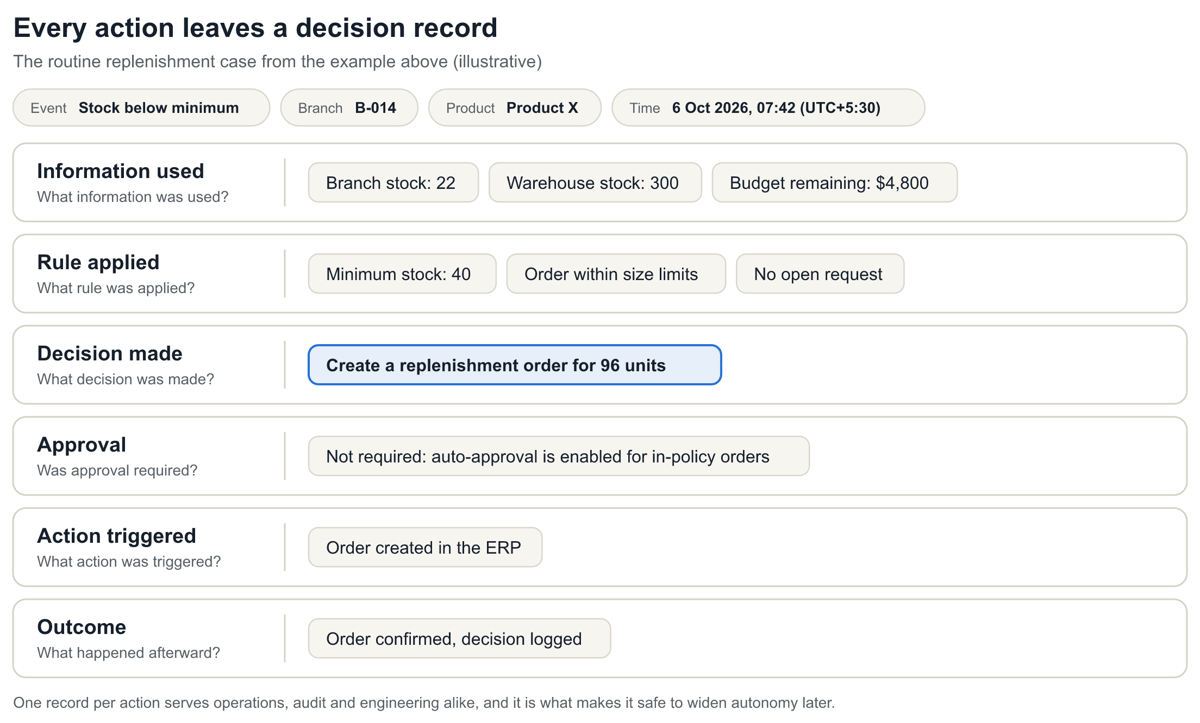
This record serves three audiences at once: the operations lead who wants to know why an order appeared, the auditor who wants evidence of controls, and the engineer who needs to debug a bad decision. It is also what lets you widen the AI’s autonomy later with confidence, because you can show what it did last quarter.
The log itself should be tamper-evident, and AI usage should be recorded in a cost ledger that cannot be quietly edited after the fact, so every workflow’s cost can be tied to its outcome.
Measure accuracy continuously
Traceability tells you what happened. Accuracy monitoring tells you whether it was right. It matters: in McKinsey’s 2025 survey, 51% of respondents from organizations using AI had seen at least one negative consequence, and inaccuracy was the risk they most often said they had experienced. Accuracy is not a launch-day test. It is a number you watch every week.
A small set of metrics, tracked per workflow, is enough to start:
| Metric | What it tells you | If it slips |
|---|---|---|
| Agreement rate | How often the AI’s proposal matches what a person would have decided, measured in shadow mode and then on a sample | Keep the AI in proposal-only mode and fix the rules or context |
| Override rate | How often approvers change or reject a proposal, and why | Update rules or knowledge from the reasons given |
| Reversal rate | How often an automatic action is later undone or corrected, such as a wrong order or a reversed refund | Tighten the auto-approval rule, or switch it off |
| Exception rate | The share of cases escalated to people; a sharp rise or fall both signal change | Check data feeds, thresholds and recent business changes |
| Classification accuracy | How often the step that reads customer text picks the right category | Add examples or categories, and re-test |
Five habits keep those numbers honest:
Test against a fixed set of past cases. Keep real, anonymized cases with known right answers and re-run them whenever the model, prompt, rules or data connection changes, and before each seasonal or product change.
Audit automatic actions by sample. A regular random sample reviewed by a person catches quiet errors that no alert will.
Link the stop switch to the metrics. The workflow should pause itself when its error rate passes the ceiling you set.
Make answers checkable. Where the AI answers from company data, require citations a person can follow.
Close the loop. Record the approver’s reason for every override and feed it back into the rules and the shared knowledge layer.
Where the industry is heading in 2026
The data tells a consistent story: adoption is broad, scaled impact is narrow, and the gap is mostly about workflow and governance, not model quality.
Agents are scaling, but unevenly. In McKinsey’s 2026 survey, 40% of respondents from large organizations report scaling AI agents, up from 27% a year earlier. Among smaller organizations the share stayed flat at 22%.
Individual gains have not become enterprise returns. Eighty percent say AI improved their own productivity, yet only 37% attribute any EBIT impact to AI, essentially unchanged from 2025. High performers, those attributing 5% or more of EBIT to AI, are still about 6% of respondents.
Redesign beats bolt-on. Nearly three-quarters of high performers fundamentally redesigned workflows, against about one-quarter of everyone else.
Early returns show up in operations. Respondents most often report cost reductions from AI in supply chain management, service operations and manufacturing, the same areas as the examples in this article.
Cost discipline is arriving. About one in five respondents say AI operating costs, including tokens, are limiting their AI use. Tie each workflow to a measurable outcome and keep a usage ledger the finance team can trust.
Hype is being filtered. Gartner predicts over 40% of agentic AI projects will be canceled by the end of 2027 because of escalating costs, unclear value or inadequate risk controls, and estimates only about 130 of the thousands of agentic AI vendors are real. It also expects at least 15% of day-to-day work decisions to be made autonomously through agentic AI by 2028, up from 0% in 2024.
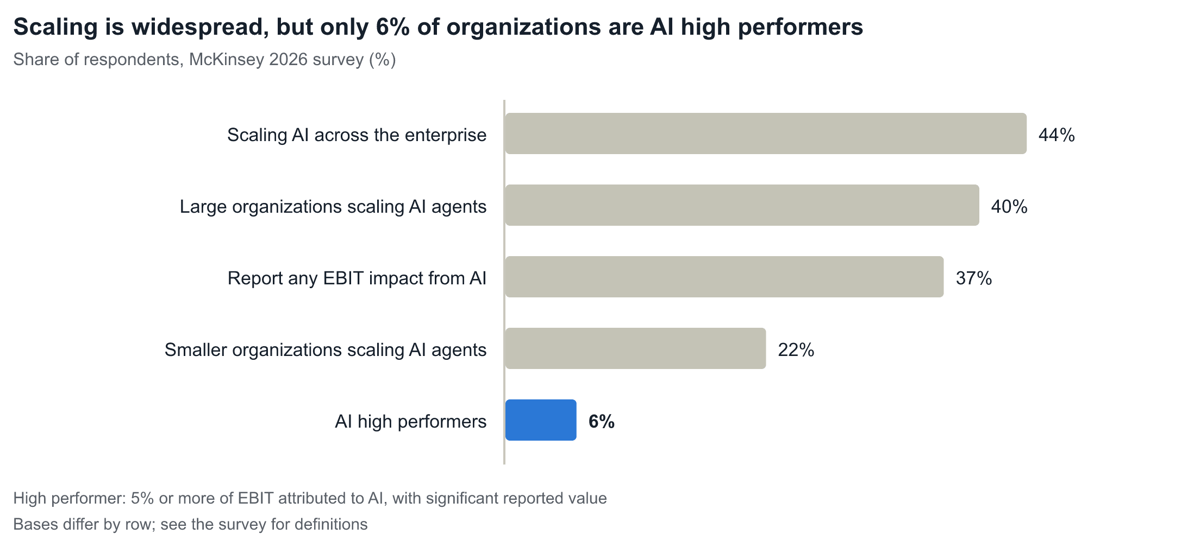
Read together, these point to the same conclusion: the winners will be the organizations that pick a workflow, redesign it around AI, and put controls in from day one.
How to start: a practical checklist
Start with one workflow, not a platform. These steps work for a replenishment flow, a refund flow or an invoice flow alike.
Pick a workflow with high volume, clear rules and a visible exception pattern.
Write the decision rules down in plain language, including who approves what.
Classify each action by cost of error and reversibility, and assign an autonomy level.
Sequence by access: workflows that need no internal system access (creative, social, knowledge) can start first; those that need POS or ERP access follow once access is agreed.
Connect to systems read-only first; add write access one action at a time.
Classify the personal data each workflow touches, mask what the AI does not need, and set access by role.
Run in shadow mode: the AI proposes, people act, you compare the two.
Define success metrics before launch: time to resolution, exception rate, error rate.
Set accuracy targets and a pause threshold, and keep a test set of real cases.
Turn on decision records and approvals before turning on autonomy.
Pilot on one region, business unit or product line before wider rollout.
Review exceptions weekly, then widen the autonomous scope where the record supports it.
If you want a second pair of eyes on this, book a free consultation with Axceera. We will help you map your functions and scope a Phase 1 that can start without waiting on internal system access. Axceera has delivered 150+ solutions across 7 core industries over 10+ years. You can reach us at hello@axceera.com.
Frequently asked questions
What is Enterprise AI?
AI connected to a business’s data, rules, systems and approvals so it can move a workflow forward, not just answer questions about it.
How is Enterprise AI different from an AI agent?
An agent is the component that plans and carries out multi-step tasks. Enterprise AI is the agent plus everything that makes it safe and useful in a business: shared context, rules, integrations, approvals and an audit trail.
Do we have to replace our existing systems?
No. The AI layer should work with your ERP, POS, CRM and other systems of record through governed integrations.
Does AI taking action mean no human oversight?
No. Reading, drafting and internal steps can run automatically. Anything that spends money, messages a customer, publishes content or changes another system waits for a person by default, unless the business has recorded a specific exception for routine, in-policy cases.
Can customer messages manipulate the AI?
They should not be able to. A customer’s own words are treated as untrusted input and limited to a narrow classification step. They never become the body of an outbound reply or a parameter to a privileged action.
Can someone approve their own request?
No. Under a four-eyes rule, the person who starts a run can never be the one who approves it.
How do we know the AI is accurate?
You measure it. Compare its proposals with human decisions in shadow mode, track override and reversal rates after launch, re-test on past cases whenever anything changes, and let the workflow pause itself if errors pass a set limit.
How is personal data protected?
Through design choices rather than promises: classify personal data, send the model only the fields it needs, enforce access by role in the data layer, keep credentials out of prompts, and set retention limits. Legal obligations vary by country, so involve your privacy lead early.
Where should we start?
With one high-volume workflow that has clear rules and a visible exception pattern, run in shadow mode before it acts. Workflows that need no internal system access can begin first.
Get your FREE Enterprise AI e-book.
Sources
As of October 12, 2026. Replenishment figures, refund, ad and invoice thresholds, and the decision record are illustrative examples.
McKinsey & Company, The state of AI in 2026: On the road to ROI (August 25, 2026)
McKinsey & Company, The state of AI in 2025: Agents, innovation, and transformation (November 5, 2025)
Gartner, Gartner Predicts Over 40% of Agentic AI Projects Will Be Canceled by End of 2027 (June 25, 2025)